1. What crosses the boundary
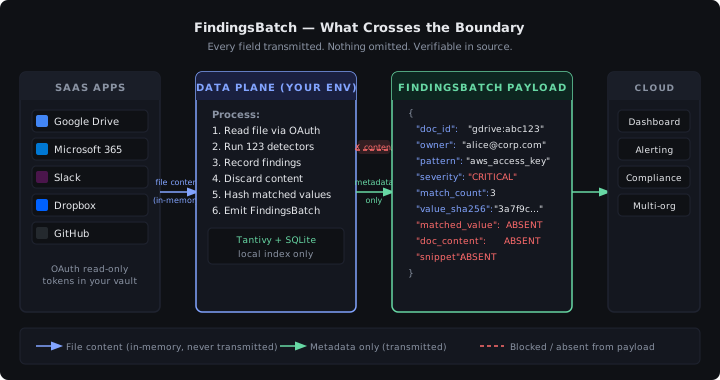
When nanodlp finds a match, it ships a FindingsBatch to the control plane. Here is the actual JSON schema — annotated to show what is and is not included:
{
  "batch_id": "01HXZ...",          // UUID — no document content
  "tenant_id": "acme-corp",
  "data_plane_version": "0.9.4",
  "findings": [
    {
      "doc_id": "1BxK...",          // Drive file ID — not the filename
      "owner_email": "alice@acme.com", // configurable: can be hashed or omitted
      "connector": "google_drive",
      "pattern_name": "aws_access_key",
      "severity": "critical",
      "match_count": 1,
      "match_hash": "sha256:3a7f...", // hash of match value — NOT the value itself
      "context_window": null,         // always null — no surrounding text
      "body": null,                   // always null — document bytes never included
      "snippet": null                 // always null — no text excerpt
    }
  ],
  "scanned_at": "2026-04-28T14:22:00Z"
}
What is NOT in there: document text, match values, file contents, snippets, surrounding context. The control plane learns that a document owned by alice@acme.com contains an AWS key. It does not learn what the key is.
2. Architecture diagram
The diagram below shows every step in the data flow — what stays in your environment, what crosses the boundary, and what is explicitly absent from the payload.
3. Where OAuth tokens live
In your secret store: HashiCorp Vault, AWS Secrets Manager, Azure Key Vault, GCP Secret Manager, or a file on disk you own. Tokens never touch our control plane. nanodlp reads them at scan time via a pluggable secret backend. The control plane has no credential store.
4. Authentication
Each data plane instance has an Ed25519 keypair generated at install time. The private key lives in your secret store. The public key is registered with the control plane during nanodlp init. Every API call from the data plane is signed with a 5-minute JWT — short-lived, non-replayable.
5. Updates flow the other way
Pattern catalogs and policy bundles flow control-plane → data-plane, signed with our release key. The data plane verifies the signature before applying any update. You can pin to a specific catalog version and review diffs before applying.
6. What we DO see
To be explicit about what the control plane does receive:
- Detection counts per pattern category
- Document IDs (opaque identifiers from the source connector)
- Owner emails (configurable — can be hashed or omitted entirely)
- Pattern names and severity levels
- SHA-256 hashes of matched values (for cross-document deduplication)
- Scan timestamps and data plane version
NOT received: matched values themselves, document text, file bytes, snippets, surrounding context.
7. Threat model
We're explicit about our assumptions:
- We assume your environment is honest. If a malicious process in your environment modifies the binary, we can't detect that. Use your standard binary integrity tooling.
- We assume the network is hostile. All control-plane communication uses mTLS with certificate pinning. The data plane rejects any control-plane response that doesn't match the pinned certificate.
- We assume our control plane is honest. We maintain audit logs of all policy pushes. If you don't trust us, the data plane is open source — read it line by line, rebuild the binary, verify the SHA matches our release.
- We do not assume the data plane is tamper-proof. It's a binary in your environment. Treat it like any other binary you run.
8. Compliance posture
Because the data plane runs in your environment and we never process your PHI, PCI data, or PII:
- We are not a HIPAA Business Associate. No BAA required.
- We are not a PCI-DSS service provider for your cardholder data.
- We have no cross-border data transfer to disclose under Schrems II.
- Your DPO does not need to add us to your subprocessor list for data content.
We do hold SOC 2 Type II (in progress) and HITRUST i1 (in progress) for the control plane itself — covering our infrastructure, access controls, and incident response.
9. Open source the data plane
Read every line at github.com/nanodlp/nanodlp. Submit issues. Re-build the binary yourself; verify it matches our published SHA-256. Don't trust our claims — verify them.
# Verify the binary matches our published SHA
curl -fsSL https://nanodlp.io/releases/0.9.4/SHA256SUMS | grep nanodlp-linux-amd64
sha256sum nanodlp-linux-amd64